One code on the back label

It scans at the checkout like your barcode, opens your EU e-label in the shopper’s language, and keeps working after you print. Even if you cancel.

Free for up to 3 products, no card needed.

  • Made in Europe
  • Account data stored in the EU

The back label

Turn the bottle around

On wine, energy and allergens stay on the label. Ingredients and nutrition may sit behind a QR code, on a page without marketing or tracking. Backlabel makes that code.

The checkout

The till reads your barcode number

The code carries your GTIN as a GS1 Digital Link. 2D scanners ring it up like your EAN, as retailers move to QR codes for GS1 Sunrise 2027.

The shopper

The shopper reads it in their language

Headings and nutrition in all 24 EU languages, with the official EU terms. No app to install, no tracking, no advertising.

You

Change the page, not the label

Add a batch or flag a recall whenever you like. The printed code stays the same, so there is nothing to reprint.

Your dashboardCuvée Exemple 2024

Lot L2024-07

Already have an e-label?

Nothing to reprint
Bottles on the shelf keep the code they have. Put the Backlabel code on the next labels you print.
More than the e-label
The same code carries your barcode number for 2D checkouts, can flag a recall for one lot, and keeps working if you cancel.
Point your old code here
If your current provider lets you change where a code points, send it to your Backlabel e-label. Old and new bottles then show the same page.

Scan a sample bottle

Each code opens what a shopper would see. The till reads the barcode number from the same code. Try the recall on the wine.

  • Wine

    Cuvée Exemple 2024

    Red wine · Domaine Exemple

    13% vol750 ml ℮

    E 297 kJ / 72 kcal per 100 ml

    Contains sulphites

    Produced and bottled by Domaine Exemple. Store upright, away from light.

    Ingredients and nutrition

    Lot L2024-07

    95 0 6 0 0 01 3 4 3 5 2

    The till reads GTIN 09506000134352

  • Beer

    Saison Voorbeeld

    Saison · Brouwerij Voorbeeld

    6.5% vol330 ml ℮

    E 218 kJ / 52 kcal per 100 ml

    Ingredients: water, barley malt, wheat malt, hops, yeast

    Contains barley and wheat

    Brewed and bottled by Brouwerij Voorbeeld. Serve at 8–10 °C.

    More about this beer

    Lot L2026-112

    95 0 6 0 0 01 3 4 3 7 6

    The till reads GTIN 09506000134376

  • Spirits

    Oude Jenever Voorbeeld

    Jenever · Stokerij Voorbeeld

    35% vol700 ml ℮

    E 801 kJ / 193 kcal per 100 ml

    Distilled and bottled by Stokerij Voorbeeld.

    Ingredients

    Lot L2026-03

    95 0 6 0 0 01 3 4 3 8 3

    The till reads GTIN 09506000134383

  • Non-alcoholic

    Zéro Blanc

    Alcohol-free white wine · Domaine Exemple

    0.0% vol750 ml ℮

    E 77 kJ / 18 kcal per 100 ml

    Contains sulphites

    Best before end 12/2027. Store cool and upright.

    Ingredients and nutrition

    Lot L2026-05

    95 0 6 0 0 01 3 4 3 9 0

    The till reads GTIN 09506000134390

Try it with your wine

Fill in your wine and scan the code with your phone. You’ll see the e-label a shopper gets, in your phone’s language.

Scan this with your phone camera

Your e-label opens in your phone’s language.

This demo code carries your label inside the link, so it looks busy. A printed Backlabel code holds only a short link.

Ready in ten minutes

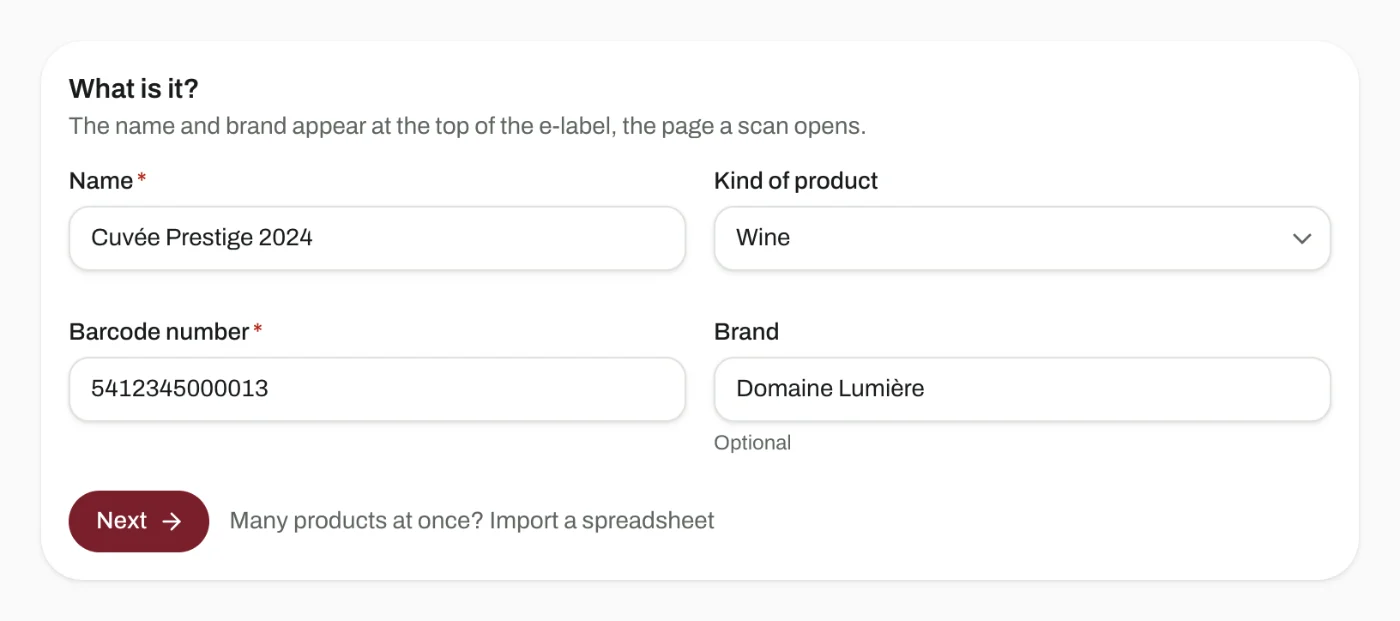
  1. Add your product

    Enter its barcode number (GTIN), name and category.

    Add your product
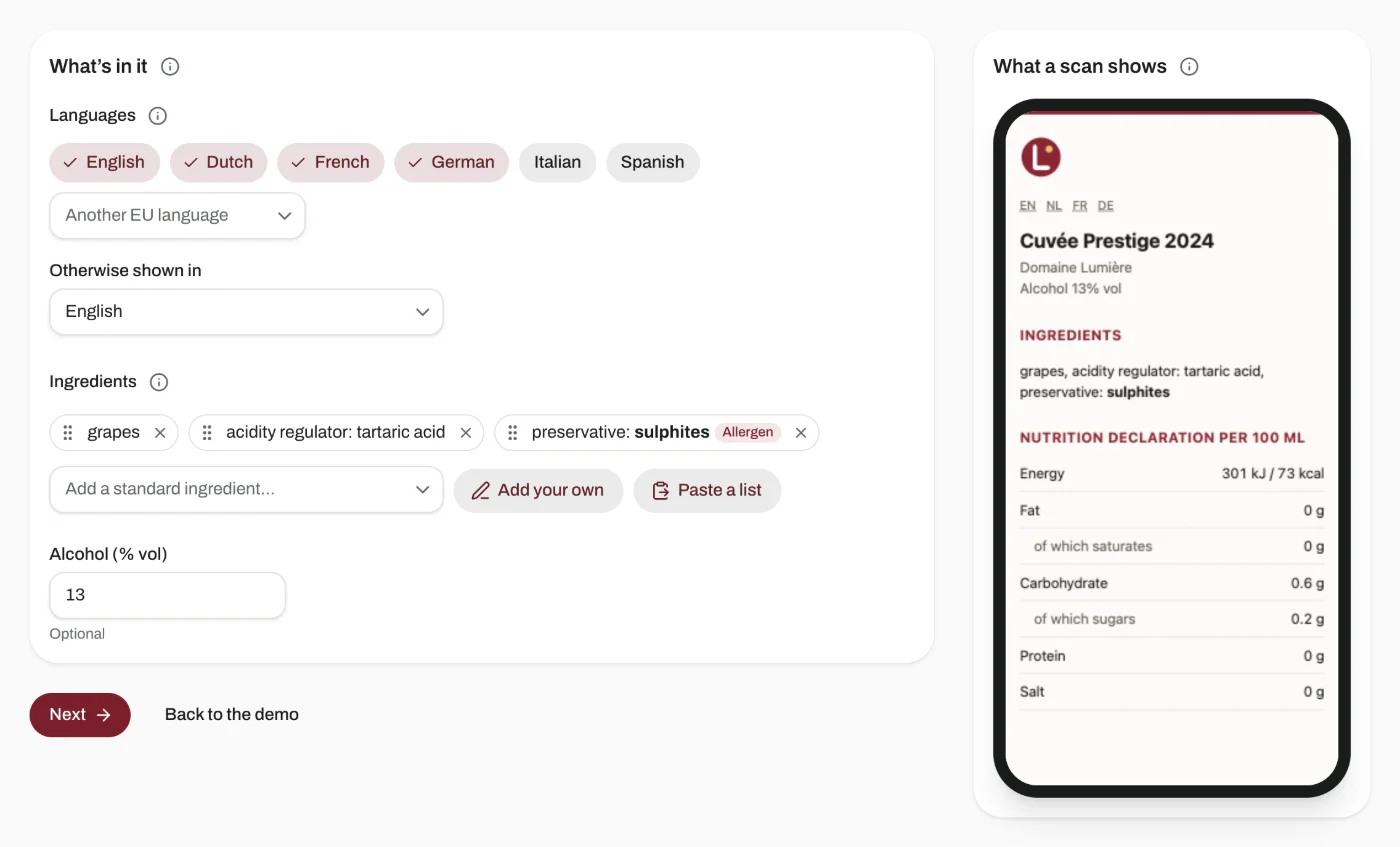
  2. Fill in the label

    Pick the ingredients from a list in all 24 EU languages and fill in the nutrition. You see the e-label as you type.

    Fill in the label
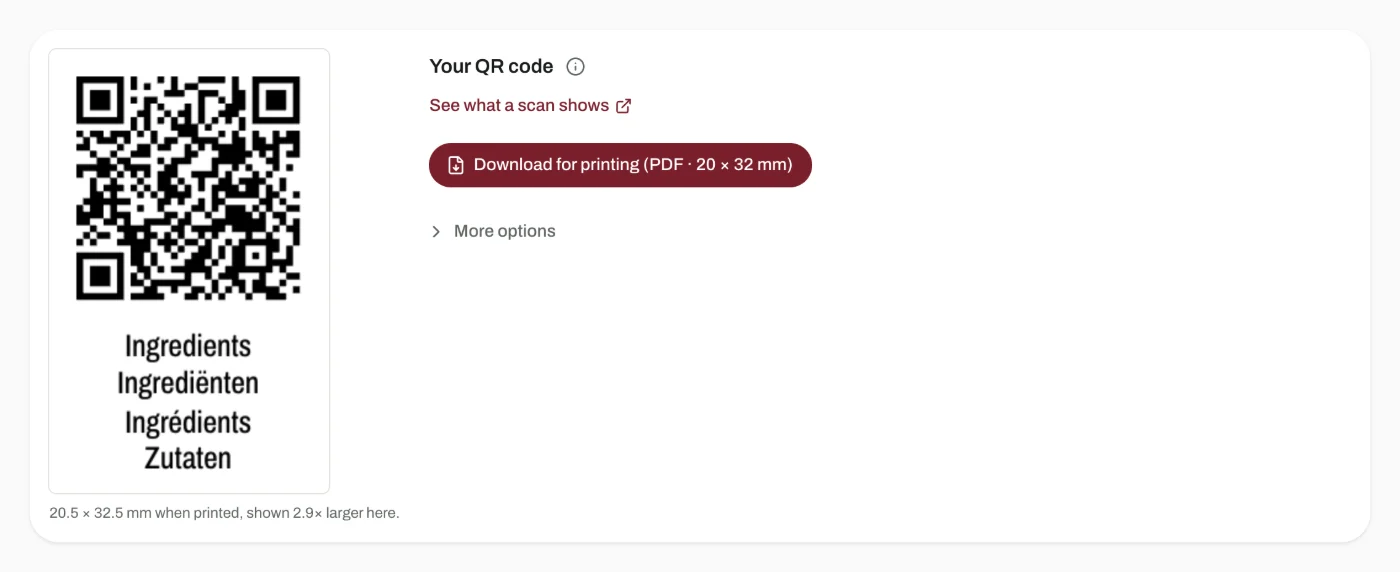
  3. Print the code

    Download the code as a print-ready PDF, with the word “Ingredients” under it, and send it to your printer with the rest of the artwork.

    Print the code

Inside the dashboard

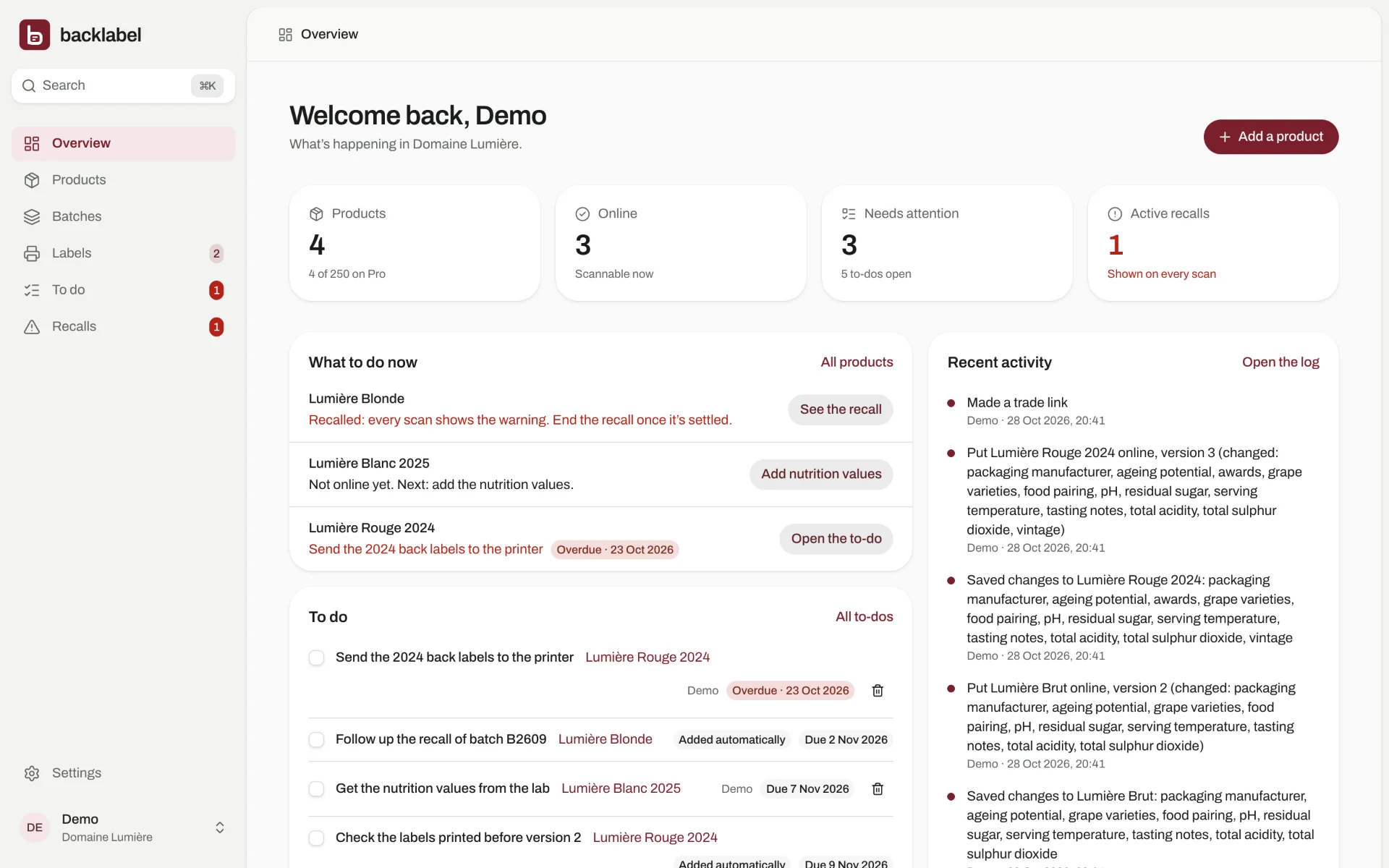
These are real screens from Backlabel. Click through them, or try the demo yourself: nothing you change is saved.

What to do now
The overview gives every product its next step: values to fill in, labels to print, a to-do that’s due or a recall.

Why now

  1. 8 December 2023

    Wine sold in the EU must list ingredients and nutrition. Energy and allergens stay on the bottle; the rest may sit behind a QR code, on a page without marketing or tracking.

  2. 2026

    The EU wine package (Regulation 2026/471) updates the labelling rules for wine, including new terms for alcohol-free and low-alcohol wine.

  3. End of 2027

    GS1 Sunrise 2027: the retail industry’s target for checkout scanners to read 2D codes such as QR codes, next to barcodes.

Pricing

Pay for the number of products you label. Scans are always unlimited.

Free

€0

  • Up to 3 products
  • GS1 QR codes and EU e-labels
  • Codes keep working if you cancel
Start free

Starter

€12/month

  • Up to 25 products
  • GS1 QR codes and EU e-labels
  • Batch codes and recalls
  • Your logo and colour on the e-label
  • Technical sheets and spreadsheets for buyers
  • Codes keep working if you cancel
Choose Starter

Pro

€39/month

  • Up to 250 products
  • GS1 QR codes and EU e-labels
  • Batch codes and recalls
  • Your logo and colour on the e-label
  • Technical sheets and spreadsheets for buyers
  • Codes keep working if you cancel
Choose Pro

Business

€99/month

  • Unlimited products
  • GS1 QR codes and EU e-labels
  • Batch codes and recalls
  • Your logo and colour on the e-label
  • Technical sheets and spreadsheets for buyers
  • Codes keep working if you cancel
Choose Business

Prices exclude VAT. Payments run through Stripe, which handles VAT and invoices.

Questions

What happens to my codes if I stop paying?

They keep working. Every code keeps pointing to the last page you published. Cancelling only stops you from adding new products.

What happens to my codes if Backlabel stops?

The checkout keeps working either way: your barcode number sits inside the code itself, and the till reads it without asking us. For the e-label, we’ll tell you at least 12 months ahead and keep every code working during that time.

I already have an e-label. Do I need to reprint?

No. Bottles already printed keep their code. Use the Backlabel code on your next print run. If your current provider lets you change where its codes point, point them to your Backlabel e-label, so every bottle shows the same page.

Do I need a GTIN?

Yes. The GTIN is the number under your barcode, and the code is built on it: that’s how a checkout knows which product it is. Already have barcodes? Then you have GTINs. No barcode yet? Your national GS1 organisation gives you a range of numbers for a yearly fee that differs per country. Most shops ask for one before they stock you anyway.

When can I start using Backlabel?

Today. Open a free account for up to 3 products, and choose a paid plan when you need more products or batch codes. Our free tools stay free: check your GTIN, work out the energy value of your wine and the print size of your QR code.

Does the e-label follow the EU wine rules?

The e-label page shows ingredients and nutrition, with no advertising and no tracking. Headings, nutrition terms and the ingredients from our list appear in the shopper’s language; ingredients you add yourself appear as you write them in each language. You stay responsible for the values you enter.

Who handles VAT and invoices?

Payments run through Stripe, which sells through Link as merchant of record and handles VAT and invoices in more than 80 countries.

Put your first product online today

Free for up to 3 products, no card needed.